The cross platform code that isn't.
A couple of weeks ago, another piece of wxWidgets infrastructure in the Alter Aeon client was replaced with custom code. This time, it was the bulk of the keyboard handling code that fell in battle.
In theory, the wxWidgets keyPressEvent is where you should trap out various key combinations; things like 'a', the escape key, and 'control-c' pairs. Certainly under linux, nearly all of these worked correctly, and the ones that didn't were obscure and not really worth hunting down. When I first ported to Win32, all that changed.
In Win32 builds, a lot of keys were not handled by the key press event. You'd press the key combination, and nothing would happen. It was like the operating system was trapping out the key combination and never bothering to pass it up the stack. As it turns out, that's pretty much exactly what was happening.
I did eventually get the Win32 builds to work by intercepting a handful of keys at the keyDownEvent and keyUpEvent layers. When I finally found these, it was hugely helpful; in the end, I trapped on the order of 30 key combinations to do away with things like annoying system beeps and idiotic behavior of the default keystrokes, in addition to handling our own special control combinations.
Enter Mac OSX. Enter a whole new raft of keyboard weirdness. I hacked on this for about an hour, and quickly realized that I was on the path to madness. The code was becoming a rat's nest of ifdefs with key combinations trapped out in multiple different layers in different operating systems.
About the only thing that could be called consistent between any of the operating systems was that the keyDownEvent and keyUpEvent were always reliable. The solution then seemed obvious: move everything down into the keyDownEvent, and ignore everything else. Intercept the keyboard control -before- wxWidgets could do anything stupid with it.
Keyboard control now works consistently and reliably on all three platforms.
Showing posts with label client. Show all posts
Showing posts with label client. Show all posts
Monday, September 26, 2011


Saturday, July 9, 2011
wxWidgets GTK font rendering
In my previous post, I managed to fix the bugs in wxDC::DrawPoint() by using my own custom drawing class. Unfortunately, a lot of the places I where I used DrawPoint were also places where I needed to draw text, and in order to draw text I needed a wxDC. No problem, I'll just draw the text using a temporary wxMemoryDC on the bitmap, and to make sure there's no clobbering problems I'll make sure that I don't intermingle direct drawing scope with the DC object scope.
This appeared to work, except for the scrolling/updating windows. For some reason, even though there was a Clear() call before the font rendering, the windows would never clear. If I destroyed and recreated the bitmap every time, it worked fine but was very slow. If I cleared after drawing the text, the clear worked. If I cleared before drawing the text, the clear did not work.
Eventually I figured out the reason:
Under wxGTK, wxDC drawing and rendering are done to a separate bitmap/bitmap layer that is permanently attached to the real bitmap. When font data is drawn using wxDC::DrawText(), the text is drawn to the hidden layer, then the hidden layer is blitted in its entirety on top of the real bitmap. The end result is that anything you do prior to constructing the DC and rendering text with that DC is overwritten/deleted when the DC destructs.
Just how the hell does this make any sense? Nevermind, forget I asked. On the plus side, this explains why full screen font rendering is so slow in wxGTK. I never could figure that part of it out.
For roughly a day, I was utterly at a loss when faced with this problem. Switch back to the old code and lose the MacOS X platform; stay with the new code and lose wxGTK (and possibly other platforms, I only ever tested it on GTK.) I couldn't even think of a way to work around it.
Eventually, a possible solution presented itself: add font rendering to my custom bitmap class. I wasn't real clear on how to do this at first, but the key breakthrough came when I realized I could just use a cheap glyph rendering scheme. Use wxDC to draw each of the letters I needed (ascii chars 32 through 126) into tiny, clean bitmaps, then use a modified alpha channel copy routine to draw them to my custom bitmaps.
I'm proud to say that I now have proper text rendering and graphical drawing primitives on all three platforms. And to think that all I needed to do was rewrite the entire wxDC rendering system to do it!
I should have just done it in the first place, as I recommended to myself in a past life. Sometimes our older selves are no wiser than we are in youth.
This appeared to work, except for the scrolling/updating windows. For some reason, even though there was a Clear() call before the font rendering, the windows would never clear. If I destroyed and recreated the bitmap every time, it worked fine but was very slow. If I cleared after drawing the text, the clear worked. If I cleared before drawing the text, the clear did not work.
Eventually I figured out the reason:
Under wxGTK, wxDC drawing and rendering are done to a separate bitmap/bitmap layer that is permanently attached to the real bitmap. When font data is drawn using wxDC::DrawText(), the text is drawn to the hidden layer, then the hidden layer is blitted in its entirety on top of the real bitmap. The end result is that anything you do prior to constructing the DC and rendering text with that DC is overwritten/deleted when the DC destructs.
Just how the hell does this make any sense? Nevermind, forget I asked. On the plus side, this explains why full screen font rendering is so slow in wxGTK. I never could figure that part of it out.
For roughly a day, I was utterly at a loss when faced with this problem. Switch back to the old code and lose the MacOS X platform; stay with the new code and lose wxGTK (and possibly other platforms, I only ever tested it on GTK.) I couldn't even think of a way to work around it.
Eventually, a possible solution presented itself: add font rendering to my custom bitmap class. I wasn't real clear on how to do this at first, but the key breakthrough came when I realized I could just use a cheap glyph rendering scheme. Use wxDC to draw each of the letters I needed (ascii chars 32 through 126) into tiny, clean bitmaps, then use a modified alpha channel copy routine to draw them to my custom bitmaps.
I'm proud to say that I now have proper text rendering and graphical drawing primitives on all three platforms. And to think that all I needed to do was rewrite the entire wxDC rendering system to do it!
I should have just done it in the first place, as I recommended to myself in a past life. Sometimes our older selves are no wiser than we are in youth.
wxwidgets has no alpha channel
A few months after I ported the Alter Aeon client to the wxWidgets toolkit, I decided I wanted to add alpha overlay support to the automap and main window.
Encouragingly enough, this appeared to be trivially supported: wxColor included an alpha value, bitmaps could be defined as having an alpha channel, etc. Pretty much everything looked good to go, so I started experimenting with it.
Alas, it was not to be. It turns out that there are precisely three places where the alpha channel is used:
1) loading a PNG from PNG data that has an alpha channel,
2) drawing a bitmap containing alpha channel data using wxDC::DrawBitmap, and
3) wxDC::DrawText, which politely draws text on top of the underlying pixels.
For all other locations, there simply should have been this assert:
wxASSERT("Alpha channel is stubbed here and works on precisely zero platforms ever, ha ha, the joke is on you")
After upgrading to wx 2.9 and a pile of scouting around, I came across wx/rawbmp.h, which has some direct access functions that allow access to the alpha channel. With this, I managed to get alpha channel working - but there were other problems with 2.9, so I downgraded back to stable, 2.8.12.
The alpha channel code that worked under 2.9 works properly under wx 2.8.12 in wxMAC and wxGTK, but apparently isn't implemented under Win32, which happens to be my main development platform.
Rather than bash my skull repeatedly against the wall, I did what any sane developer would do: throw out the broken toolkit module, and write one that works. In the end, I ended up with a wxBitmap derived class that has drawing functions that actually work properly and support alpha channel drawing when I need them to.
However, there's a problem with this as well, which I'll detail in a later post.
Encouragingly enough, this appeared to be trivially supported: wxColor included an alpha value, bitmaps could be defined as having an alpha channel, etc. Pretty much everything looked good to go, so I started experimenting with it.
Alas, it was not to be. It turns out that there are precisely three places where the alpha channel is used:
1) loading a PNG from PNG data that has an alpha channel,
2) drawing a bitmap containing alpha channel data using wxDC::DrawBitmap, and
3) wxDC::DrawText, which politely draws text on top of the underlying pixels.
For all other locations, there simply should have been this assert:
wxASSERT("Alpha channel is stubbed here and works on precisely zero platforms ever, ha ha, the joke is on you")
After upgrading to wx 2.9 and a pile of scouting around, I came across wx/rawbmp.h, which has some direct access functions that allow access to the alpha channel. With this, I managed to get alpha channel working - but there were other problems with 2.9, so I downgraded back to stable, 2.8.12.
The alpha channel code that worked under 2.9 works properly under wx 2.8.12 in wxMAC and wxGTK, but apparently isn't implemented under Win32, which happens to be my main development platform.
Rather than bash my skull repeatedly against the wall, I did what any sane developer would do: throw out the broken toolkit module, and write one that works. In the end, I ended up with a wxBitmap derived class that has drawing functions that actually work properly and support alpha channel drawing when I need them to.
However, there's a problem with this as well, which I'll detail in a later post.
Tuesday, March 16, 2010
More Clienty Goodness
Since I've posted last, I've released two versions of the Alter Aeon client, with a host of improvements and new functionality. A lot of this has been layout and theme changes, but there's also a more substantial newbie mode and other feature updates. I even managed to get a primitive mouseover compass working in the automap!
Here's a screenshot of what the new interface can do and looks like:

(Note - this is the X/FVWM/GTK version of the client, so the window decorations around the outside will look a bit different from the Windows version.)
We've got a lot of other improvements coming in later versions, but now it's time to get back to work on game mechanics.
Here's a screenshot of what the new interface can do and looks like:

(Note - this is the X/FVWM/GTK version of the client, so the window decorations around the outside will look a bit different from the Windows version.)
We've got a lot of other improvements coming in later versions, but now it's time to get back to work on game mechanics.
Friday, December 4, 2009
New DClient release
Version 0.983 is out. This is mostly a bugfix/maintenance release:
----------------
The center direction/scan button now does a customized scan/look.
Function key presses now release scroll lock.
The 'you are here' diamond in the automap is now thicker.
Add 'mini status bar' menu option to allow hpbar above input window.
Minor updates to group status bar look.
The vote menu can now be updated from the server.
Added 'check for updates' option under 'help' menu.
Minor improvements to url clicking in the main window.
Improve road and trail display in the automap.
More fixes to 'disappearing text' bug in input window.
----------------
As always, it can be downloaded from the Official Alter Aeon Website.
----------------
The center direction/scan button now does a customized scan/look.
Function key presses now release scroll lock.
The 'you are here' diamond in the automap is now thicker.
Add 'mini status bar' menu option to allow hpbar above input window.
Minor updates to group status bar look.
The vote menu can now be updated from the server.
Added 'check for updates' option under 'help' menu.
Minor improvements to url clicking in the main window.
Improve road and trail display in the automap.
More fixes to 'disappearing text' bug in input window.
----------------
As always, it can be downloaded from the Official Alter Aeon Website.
Tuesday, December 1, 2009
Weeds, heading off into them
I've been on a big DClient kick the last few days, with intent to get a new 0.983 release out probably by this weekend, and a 1.0 'official' release by January. I'd managed to pare down the feature list and clean up a number of niggling bugs.
This morning when I woke up, I knew I wanted to do DClient work. But I couldn't quite recall what I was supposed to work on, and before I could look it up my brain spotted a nice looking patch of weeds and headed into them, full steam ahead.
Instead of working on the newbie 'demo mode' of the client, I somehow ended up working on audio. I've been avoiding sound and audio for months now, yet for some reason I decided today was a good day to do it. It took me about four hours, but I've got audio working on my Linux dev machine, and I implemented a full mixing stack as well to allow an arbitrary number of sounds to play simultaneously.
The only problem is, now that I can play audio, what do I do with it? The initial implementation pretty much only does one thing: it plays a short algorithmically generated 'click' whenever a command is sent to the server. While great for testing, it doesn't really add to the gameplay experience.
Now I have to find both ambient background music as well as triggered audio samples for various events. I'll also have to get the audio layer working on Windows, which could take anywhere from a couple of hours to several days.
This morning when I woke up, I knew I wanted to do DClient work. But I couldn't quite recall what I was supposed to work on, and before I could look it up my brain spotted a nice looking patch of weeds and headed into them, full steam ahead.
Instead of working on the newbie 'demo mode' of the client, I somehow ended up working on audio. I've been avoiding sound and audio for months now, yet for some reason I decided today was a good day to do it. It took me about four hours, but I've got audio working on my Linux dev machine, and I implemented a full mixing stack as well to allow an arbitrary number of sounds to play simultaneously.
The only problem is, now that I can play audio, what do I do with it? The initial implementation pretty much only does one thing: it plays a short algorithmically generated 'click' whenever a command is sent to the server. While great for testing, it doesn't really add to the gameplay experience.
Now I have to find both ambient background music as well as triggered audio samples for various events. I'll also have to get the audio layer working on Windows, which could take anywhere from a couple of hours to several days.
Sunday, October 11, 2009
DClient 0.982 Released!
After a lot of hard work, intermediate releases, bug reports and beta testing, the latest version of the Alter Aeon game client is now available! It's only been about a month since the last release, but the number of updates and new features is pretty impressive. Here's some of the major things that have been updated:
In addition, there's been a pile of minor bug fixes, as well as a lot of work to clean up and improve the interface. You might also notice things like removal of scrollbars and word wrap on popup windows that don't need them, fewer buttons to be confusing for newbies, and improvements in the input text bar. Here are some examples of a couple of possible configurations:


The basic theme support and the overall interface cleanup should help us a lot with new players. The first 30 seconds of pretty buys you the next 30 seconds, etc. It seems to take forever, but incremental improvements do really add up over time.
Again, the download is at http://www.dentinmud.org/AlterAeon.exe. Snag a copy and check it out!
- Grouping status bars added.
- A new version of 'left hand layout' is now available.
- Added basic support for color themes and backgrounds.
- Side buttons now use the same color scheme and format as popup and function key buttons.
- (For builders) 'connect' command allows connecting to arbitrary ports.
- Redraw flicker reduced in popup windows.
- Add support for GMUD color scheme.
- Smoother scrolling for the automap.
In addition, there's been a pile of minor bug fixes, as well as a lot of work to clean up and improve the interface. You might also notice things like removal of scrollbars and word wrap on popup windows that don't need them, fewer buttons to be confusing for newbies, and improvements in the input text bar. Here are some examples of a couple of possible configurations:
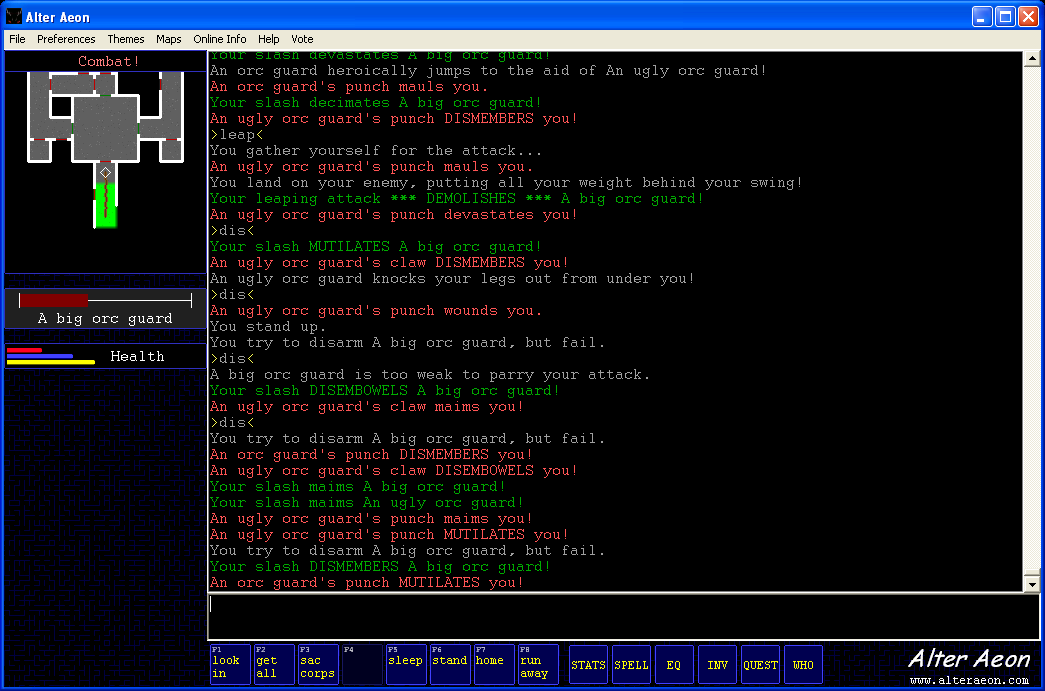

The basic theme support and the overall interface cleanup should help us a lot with new players. The first 30 seconds of pretty buys you the next 30 seconds, etc. It seems to take forever, but incremental improvements do really add up over time.
Again, the download is at http://www.dentinmud.org/AlterAeon.exe. Snag a copy and check it out!
Wednesday, October 7, 2009
Yet Another wxWidgets Fail
I've been trying off and on for a while to get transparency to work in my Linux/GTK builds, and for whatever reason it's just not working (at all.) After running some experiments last night, the best I can determine is that there simply is no alpha channel available in the wxBitmap/wxMemoryDC that I'm trying to use.
It's not that I didn't try to get one. Supposedly all you need to do is construct bitmaps with a 32 bpp and everything else will take care of itself; however, even simple operations like putting a pixel or drawing onto the DC returns 0xFF for the alpha channel every time. The alpha simply disappears. Because the alpha is gone, when I attempt to draw or blit the bitmaps, I get a full overwrite instead of a proper alpha blend.
Once again, it's beyond me how something so simple can silently fail so catastrophically while giving no indication of error or dysfunction. I'm using the modules according to the published API, and the expected results do not occur.
Naturally, there is coupled to this another issue: wxWidgets does not have very good drawing/shading and blending primitives. I could probably draw what I want using the tools, but it will be costly, both in time and processing power.
The obvious two solutions present themselves:
1) Find another library, such as OpenGL, that can I can integrate into the toolkit, or
2) Write my own graphics subsystem.
Size is, in my mind, at a premium here, so I would prefer not to bloat out the executable with another five megabytes of drawing and 3D utilities. It also just so happens that I've done a lot of game and graphics programming in the past. Graphics programming that included various primitive libraries.
Now, the only issue is how to get direct access to wxBitmap data so that I can do my drawing elsewhere, then copy into the bitmap for blitting. It just so happens that there's an undocumented 'wxRawBitmap' class that looks like it might do the job. Hooray for undocumented features. What the hell.
It's not that I didn't try to get one. Supposedly all you need to do is construct bitmaps with a 32 bpp and everything else will take care of itself; however, even simple operations like putting a pixel or drawing onto the DC returns 0xFF for the alpha channel every time. The alpha simply disappears. Because the alpha is gone, when I attempt to draw or blit the bitmaps, I get a full overwrite instead of a proper alpha blend.
Once again, it's beyond me how something so simple can silently fail so catastrophically while giving no indication of error or dysfunction. I'm using the modules according to the published API, and the expected results do not occur.
Naturally, there is coupled to this another issue: wxWidgets does not have very good drawing/shading and blending primitives. I could probably draw what I want using the tools, but it will be costly, both in time and processing power.
The obvious two solutions present themselves:
1) Find another library, such as OpenGL, that can I can integrate into the toolkit, or
2) Write my own graphics subsystem.
Size is, in my mind, at a premium here, so I would prefer not to bloat out the executable with another five megabytes of drawing and 3D utilities. It also just so happens that I've done a lot of game and graphics programming in the past. Graphics programming that included various primitive libraries.
Now, the only issue is how to get direct access to wxBitmap data so that I can do my drawing elsewhere, then copy into the bitmap for blitting. It just so happens that there's an undocumented 'wxRawBitmap' class that looks like it might do the job. Hooray for undocumented features. What the hell.
Saturday, October 3, 2009
Client Customization
As part of my quest to improve the client, I accidentally embarked on sanitizing the button color scheme and making various colors consistent across the codebase. When this was done, it occurred to me to fiddle with them, and I ended up with some very interesting results, which you can find in the dentinmud.org screenshots directory.
Here's some direct links:
Red Alter Aeon Screenshot
Blue Alter Aeon Screenshot
Default Color Alter Aeon Screenshot
I personally like the blue a lot, but that's just me. A lot of players expressed concern at the blue layout or found it ugly. The red one was almost universally disliked, which I found surprising. Attempts to tweak it were really unproductive; for whatever reason, it seems very difficult to come up with red background color schemes that don't look terrible.
The current plan for the next day or so is to at least make these run-time selectable, though most players disable all of the buttons when they play anyway.
Strange as it may seem, I think the blue adds a whole new level of cool factor to the initial impression of the client. It's definitely eye catching, which is probably a good thing given the stunningly high dropout rates of people who try the client cold.
Here's some direct links:
Red Alter Aeon Screenshot

Blue Alter Aeon Screenshot
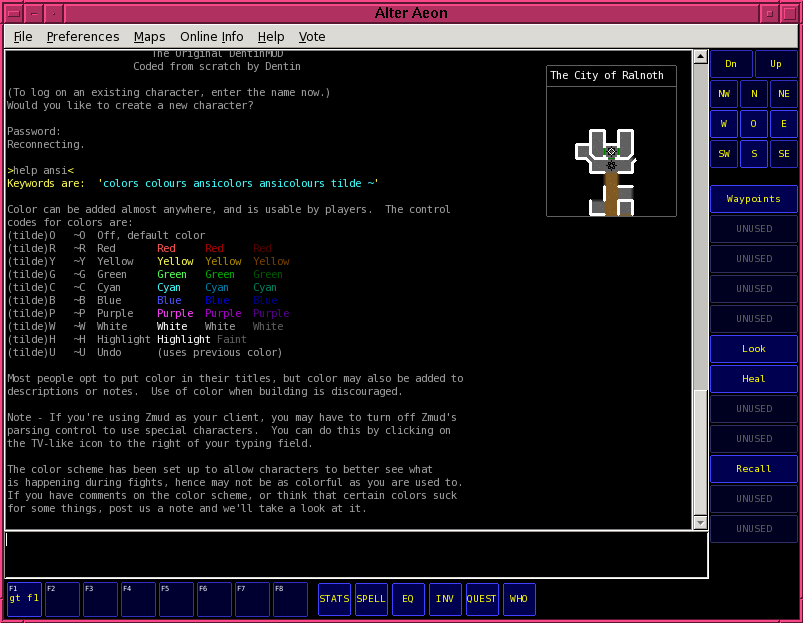
Default Color Alter Aeon Screenshot
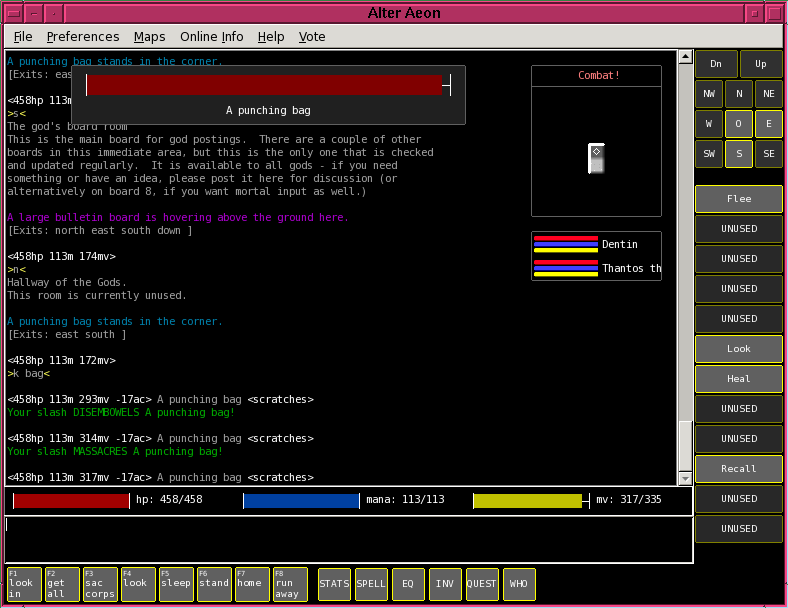
I personally like the blue a lot, but that's just me. A lot of players expressed concern at the blue layout or found it ugly. The red one was almost universally disliked, which I found surprising. Attempts to tweak it were really unproductive; for whatever reason, it seems very difficult to come up with red background color schemes that don't look terrible.
The current plan for the next day or so is to at least make these run-time selectable, though most players disable all of the buttons when they play anyway.
Strange as it may seem, I think the blue adds a whole new level of cool factor to the initial impression of the client. It's definitely eye catching, which is probably a good thing given the stunningly high dropout rates of people who try the client cold.
Saturday, August 29, 2009
Client update
I've been working on the DClient code for the last couple of days, and it's coming along nicely. I had intended to do another interim release on thursday; after discovering that the Windows build of fundamental display primitives is vastly different than the Linux version, I had to go back to the drawing board and come up with a rendering/display system to avoid those issues.
Conveniently, with the new rendering system, the original problem that forced me to write the rendering system has vanished. I could probably figure it out if necessary, but at this point, I just want to get my work done. I'm still keeping the rendering system though; every piece of WX I replace is one step farther away from needing to use it at all. At some point, all that will be left is the event loop, wxDC functions, and Win32 resource management.
The improvements in this version of the client are primarily a simpler user interface with a lot less clutter. We also have popup-style windows for things like score, equipment, inventory and the who list. I've also prettied up some of the buttons, and have enough infrastructure in place to possibly start doing some window decorations.
If everything goes stunningly well, I should be able to get a testing release out Sunday night. More likely however, it'll be monday or later.
Conveniently, with the new rendering system, the original problem that forced me to write the rendering system has vanished. I could probably figure it out if necessary, but at this point, I just want to get my work done. I'm still keeping the rendering system though; every piece of WX I replace is one step farther away from needing to use it at all. At some point, all that will be left is the event loop, wxDC functions, and Win32 resource management.
The improvements in this version of the client are primarily a simpler user interface with a lot less clutter. We also have popup-style windows for things like score, equipment, inventory and the who list. I've also prettied up some of the buttons, and have enough infrastructure in place to possibly start doing some window decorations.
If everything goes stunningly well, I should be able to get a testing release out Sunday night. More likely however, it'll be monday or later.
Sunday, July 12, 2009
wxWidgets - focus problems using multiple top level windows or frames
[Updated Jul 14, 2009 - this turned out to be a code bug on my part, at least partially. Further details in the comment section.]
As I'm sure you all know, I've been putting together a graphical/GUI client for the MUD Alter Aeon for the last few years. About 9 months ago, I switched to using the wxWidgets toolkit instead of QT, for reasons of executable size and licensing.
This switch has cost me on the order of 3 full months of development time trying to work around bugs in the wxWidgets ports on various platforms. I hit another one of these porting bugs/issues today; fortunately it only cost me about four hours, and amazingly enough, I found a workaround/answer that didn't involve rewriting the component from scratch.
Long story short: if you have multiple wxFrames or top-level windows in an MSVC build, the default is that you can't focus on any but the first one. My exact scenario:
1) App creates main window frame.
2) Main window frame later on dynamically creates a handful of new popup-style frames.
3) All of these new frames are immediately defocused and placed behind the main window frame. Attempts to raise or focus them are completely and utterly ignored. The FLOAT_ON_PARENT window style does nothing.
Oddly enough, minimizing the main window sometimes allowed the children to gain focus or 'disconnect' from the main window so the focus worked properly. It wasn't reliable, and it was never clear to me exactly why or how, but it never did what I ultimately wanted anyway.
There's no documentation on why any of this should happen, at least nowhere I could find. It all worked fine in the Linux port! After multiple hours of screwing around with it and reading unrelated documentation, I finally tried something I found in an obscure post, and it worked.
The solution:
1) Don't bother to hook the focus event. It doesn't do shit anyway.
2) Hook the Activate event in your new frame. You've probably never seen this before. Neither had I. I still don't know what exactly it's supposed to do.
3) In your Activate event handler, SetFocus(), then Skip() and pass the event down. The SetFocus() brings your new frame to the top and allows it to take focus in the future.
That's it. It's all of like three lines of code; I hope it doesn't waste nearly as much of your time as it did of mine.
[Note - I understand that the wx guys are doing this basically for free, and that they're up against a nasty set of ports to get everything working properly. Still, it's cost me a lot of time, and if I had known better I would probably have just paid for a proper QT license and found some other way to reduce the file size.]
As I'm sure you all know, I've been putting together a graphical/GUI client for the MUD Alter Aeon for the last few years. About 9 months ago, I switched to using the wxWidgets toolkit instead of QT, for reasons of executable size and licensing.
This switch has cost me on the order of 3 full months of development time trying to work around bugs in the wxWidgets ports on various platforms. I hit another one of these porting bugs/issues today; fortunately it only cost me about four hours, and amazingly enough, I found a workaround/answer that didn't involve rewriting the component from scratch.
Long story short: if you have multiple wxFrames or top-level windows in an MSVC build, the default is that you can't focus on any but the first one. My exact scenario:
1) App creates main window frame.
2) Main window frame later on dynamically creates a handful of new popup-style frames.
3) All of these new frames are immediately defocused and placed behind the main window frame. Attempts to raise or focus them are completely and utterly ignored. The FLOAT_ON_PARENT window style does nothing.
Oddly enough, minimizing the main window sometimes allowed the children to gain focus or 'disconnect' from the main window so the focus worked properly. It wasn't reliable, and it was never clear to me exactly why or how, but it never did what I ultimately wanted anyway.
There's no documentation on why any of this should happen, at least nowhere I could find. It all worked fine in the Linux port! After multiple hours of screwing around with it and reading unrelated documentation, I finally tried something I found in an obscure post, and it worked.
The solution:
1) Don't bother to hook the focus event. It doesn't do shit anyway.
2) Hook the Activate event in your new frame. You've probably never seen this before. Neither had I. I still don't know what exactly it's supposed to do.
3) In your Activate event handler, SetFocus(), then Skip() and pass the event down. The SetFocus() brings your new frame to the top and allows it to take focus in the future.
That's it. It's all of like three lines of code; I hope it doesn't waste nearly as much of your time as it did of mine.
[Note - I understand that the wx guys are doing this basically for free, and that they're up against a nasty set of ports to get everything working properly. Still, it's cost me a lot of time, and if I had known better I would probably have just paid for a proper QT license and found some other way to reduce the file size.]
Saturday, July 11, 2009
Where do we go?
I've been doing some serious thinking about the game, the market, and the business model I'm trying to work with. I still think the business model is sound; I've been able to pay most expenses and use the remainder for (admittedly ineffective) advertising for years. This year will be different, as I'm dumping some of my personal money into it, but even so the numbers have risen and will compensate somewhat for that increased outflow.
The biggest problem I see with regard to expansion right now is, unfortunately, market based. If you go out to any gaming news site, it's not just that there's a handful of games being advertised - it's that there are hundreds (if not thousands) of games being advertised. It's reached the point where you're lucky if you can even find a WoW ad amidst the piles of other crap.
The gaming market right now is, as near as I can tell, in the middle of a huge investment bubble. Hundreds of companies have come on line with venture or public funding to be the next 'WoW killer'. These startup companies are pumping hundreds of millions of dollars into advertising for a limited number of players; several new cookie-cutter MMOs come out every week.
On the plus side, most of these will fail. As with all bubbles, this one will collapse, and most games will go under. There's simply not enough players right now, and once you've seen one cookie cutter game, you've seen them all. In some ways, being a text based game protects us, as we have a limited niche that isn't facing ridiculous competition.
So what do we do about it? In the immediate short term, scale back plans of massive growth, and wait for the bubble to pop. But we can't just rest on our laurels either; we should be doing something. What best to do?
Make the game the best game it can be, that's what. Most of the games that will fail, will fail precisely because they -are- cookie cutter games. Do you not think that the players on WoW would pay $5 more for a game that was $5 better than WoW? The reason that they don't is because there aren't any games $5 better than WoW.
I currently have two projects in various stages to this end. The first is the ongoing upgrade to the client, which is coming along slowly but steadily; I probably won't have a new release this weekend, but should have one soon. I think with that release I'll start looking for a graphic designer or other artistic input to make the interface pretty.
The other project is only in the planning stages: add more classes to the game. I get a lot of comments from newer players that the limited class selection looks strange and seems thin compared to other games. It also has issues (which some players call features), such as limited room for long term expansion, high level characters all being the same or very similar, a small number of high-end playing styles, and what I would consider bogus skill groupings.
I think I have a rough model of how to do class expansions now, but it will probably be several weeks before we have enough detail fleshed out to really start implementing it.
The biggest problem I see with regard to expansion right now is, unfortunately, market based. If you go out to any gaming news site, it's not just that there's a handful of games being advertised - it's that there are hundreds (if not thousands) of games being advertised. It's reached the point where you're lucky if you can even find a WoW ad amidst the piles of other crap.
The gaming market right now is, as near as I can tell, in the middle of a huge investment bubble. Hundreds of companies have come on line with venture or public funding to be the next 'WoW killer'. These startup companies are pumping hundreds of millions of dollars into advertising for a limited number of players; several new cookie-cutter MMOs come out every week.
On the plus side, most of these will fail. As with all bubbles, this one will collapse, and most games will go under. There's simply not enough players right now, and once you've seen one cookie cutter game, you've seen them all. In some ways, being a text based game protects us, as we have a limited niche that isn't facing ridiculous competition.
So what do we do about it? In the immediate short term, scale back plans of massive growth, and wait for the bubble to pop. But we can't just rest on our laurels either; we should be doing something. What best to do?
Make the game the best game it can be, that's what. Most of the games that will fail, will fail precisely because they -are- cookie cutter games. Do you not think that the players on WoW would pay $5 more for a game that was $5 better than WoW? The reason that they don't is because there aren't any games $5 better than WoW.
I currently have two projects in various stages to this end. The first is the ongoing upgrade to the client, which is coming along slowly but steadily; I probably won't have a new release this weekend, but should have one soon. I think with that release I'll start looking for a graphic designer or other artistic input to make the interface pretty.
The other project is only in the planning stages: add more classes to the game. I get a lot of comments from newer players that the limited class selection looks strange and seems thin compared to other games. It also has issues (which some players call features), such as limited room for long term expansion, high level characters all being the same or very similar, a small number of high-end playing styles, and what I would consider bogus skill groupings.
I think I have a rough model of how to do class expansions now, but it will probably be several weeks before we have enough detail fleshed out to really start implementing it.
Thursday, July 9, 2009
Client innards
I've been working on the client recently, to try to build little pop-up windows that contain useful information, for example what you're wearing, your inventory, or your stats. The basic guts of this are working, and other than the buttons being ugly it seems pretty useful.
One big problem I have yet to deal with is automatic update of the data in the windows. It's neat having the info there and all, but if it automatically updated when things changed, it would be WAY more useful. I'll have to do a bit of server side work for that to work properly.
With any luck, I'll be able to get a new client release out in the next few days, or at the very least a test build for people to experiment with. I think this will be an excellent addition to the client, and it opens up a lot of possibilities to do other things as well.
One big problem I have yet to deal with is automatic update of the data in the windows. It's neat having the info there and all, but if it automatically updated when things changed, it would be WAY more useful. I'll have to do a bit of server side work for that to work properly.
With any luck, I'll be able to get a new client release out in the next few days, or at the very least a test build for people to experiment with. I think this will be an excellent addition to the client, and it opens up a lot of possibilities to do other things as well.
Thursday, May 14, 2009
MishMash
A quick note - I built up a Muds and Mudding lens over at Squidoo. Squidoo is one of those new things which I don't entirely understand, like I don't understand Facebook or Myspace. But other people do, so perhaps it's not such a bad idea. The url is:
http://www.squidoo.com/mudding
I've been thinking about and doing a bit of work on the client recently. One of the newer changes was the addition of an enemy hitpoint bar; the current release client has this bar between the automap and the buttons. I moved it to be in the regular prompt bar, and this serves to make the screen a lot less 'busy'.
All this has got me thinking about what to do next. I really should allow for an unhooked/floating automap, so users can position it wherever they want. I've also been thinking about having a sort of 'list window' where people can perform actions on list items, such as looking in containers, getting things from containers, etc.
Until recently, the mechanics of how to do this in the code have been somewhat questionable. As usual, talking to my girlfriend about it generated a solution: uuid strings for objects and characters, that you can always use to get an exact command reference to that object or character.
I started on the first stage of this process last night, with infrastructure. The game has had a really, really bad PRNG for years; I threw something together with basically no experience about ten years ago and we've been using it ever since. Looking at the code, I'm actually somewhat surprised it didn't cause a lot of visible trouble over the years.
We now have a brand new, 10-register lagged fibbonacci PRNG driving the game. Not only is it faster, but it actually produces reasonably high quality random numbers to drive the game mechanics. Using this, im now generating proper UUIDs that I can have some amount of confidence in.
The list window however I'm less sure about. I suspect this needs a proper design.
http://www.squidoo.com/mudding
I've been thinking about and doing a bit of work on the client recently. One of the newer changes was the addition of an enemy hitpoint bar; the current release client has this bar between the automap and the buttons. I moved it to be in the regular prompt bar, and this serves to make the screen a lot less 'busy'.
All this has got me thinking about what to do next. I really should allow for an unhooked/floating automap, so users can position it wherever they want. I've also been thinking about having a sort of 'list window' where people can perform actions on list items, such as looking in containers, getting things from containers, etc.
Until recently, the mechanics of how to do this in the code have been somewhat questionable. As usual, talking to my girlfriend about it generated a solution: uuid strings for objects and characters, that you can always use to get an exact command reference to that object or character.
I started on the first stage of this process last night, with infrastructure. The game has had a really, really bad PRNG for years; I threw something together with basically no experience about ten years ago and we've been using it ever since. Looking at the code, I'm actually somewhat surprised it didn't cause a lot of visible trouble over the years.
We now have a brand new, 10-register lagged fibbonacci PRNG driving the game. Not only is it faster, but it actually produces reasonably high quality random numbers to drive the game mechanics. Using this, im now generating proper UUIDs that I can have some amount of confidence in.
The list window however I'm less sure about. I suspect this needs a proper design.
Monday, May 11, 2009
Client release and changelog
A new client release, 0.980, is out! The changelog is at the bottom of this note, with the previous changelog for 0.979 since I didn't post that anywhere else. At some point, I need to get the changelogs integrated into the server code.
The biggest two changes from my perspective were automap improvements and the enemy hp bar. The automap was by far the hardest, as display code has to be nearly perfect, and it has to handle a boatload of corner/edge cases. There's really not a lot of ways to do it cleanly, and for some scenarios you simply have to special case it. Here is an example of a particular problem area before the changes:

Here is the same location with the new mapper:

For compact areas such as this one, it makes a huge difference.
The enemy hitpoint bar is another interesting addition, in that it displays the condition of whatever you're fighting, similar to how Diablo II does it. There's a problem with it however - the current location is off to the side, above the automap. This turns out to be remarkably hard to see and use while fighting, even though it's close to the scrolling text and the input window.
I think what's going on is that the left hand side of the client is now simply too 'busy' for the eye to easily handle. Diablo II handled this by putting the enemy hp bar in a well defined, easy location (top dead center), and you knew that the middle of the screen was the most important place to look. The hp and mana bubbles were left and right bottom corner respectively. Each location is very easy to deal with.
For the client however, we have the big main window, which pretty much needs to be scanned continuously in order to keep up with things, the typing bar at the bottom but sorta off to the side, the hp and mana bars above that but right next to it, and the enemy status bar to the left somewhere in the lower middle of the screen. It's just not that easy to find things.
One option I've been kicking around is to make the status bar two levels deep, with the enemy hp directly above your hp. Not only does this give a good way to directly compare yourself against the target, but it puts both things in a very visible, single location.
I did some looking around at adding audio, and think I've found some libraries that should do the job. It's a lot of work though, and it might be best for me to figure out how to do actions and triggers first.
Changes in version 0.980 - May 08, 09
-------------------------------------------------------------
Keypad '5' now performs 'scan'.
Keypad '-' now walks 'down'.
Keypad '+' now walks 'up'.
Minor improvement to url clicking.
Don't lock main window unless more than one character is selected.
Diagonal exits now display a bit more cleanly.
Added basic zoom in/zoom out on landscape scale changes.
Left hand layout now puts automap at bottom of screen.
The automap is now either on all the time or off all the time, it no longer toggles based on login state.
Allow ctrl-+ and ctrl-- to more reliably change font when using keypad movement mode.
A display window for a target hp bar is now visible above the left hand side automap.
Changes in version 0.979 - Apr 28, 09
-------------------------------------------------------------
Add walking via number keypad. Toggleable using 'preferences' menu.
Clear scroll lock when a button is clicked.
Add 'local echo' option under 'preferences' menu.
Help message when you disconnect/are disconnected is now highlighted.
Prevent beeping for additional key combinations.
Add mousewheel support.
The 'quit' dialog buttons have been changed from 'Quit' to 'Exit Program' instead.
Command queue cleared when you're disconnected, so your next connect attempt doesnt immediately error out at the name prompt.
The '//clear' command now clears scrollback, like the menu.
The 'clear' command in game now works. It sends two screens full of blank lines, so you don't lose your scrollback.
Mapping colors tweaked to better show towns and cities.
Default ansi colors tweaked a bit to get more color saturation.
Ansi color palette options added for ZMud style colors and bright colors.
When you start fighting, the area map will display 'Combat!' instead of the area name.
A new "Left Side Layout" option has been added under preferences. This moves the buttons and automap to the left side of the screen, whereit's closer to the various text windows.
The biggest two changes from my perspective were automap improvements and the enemy hp bar. The automap was by far the hardest, as display code has to be nearly perfect, and it has to handle a boatload of corner/edge cases. There's really not a lot of ways to do it cleanly, and for some scenarios you simply have to special case it. Here is an example of a particular problem area before the changes:
Here is the same location with the new mapper:
For compact areas such as this one, it makes a huge difference.
The enemy hitpoint bar is another interesting addition, in that it displays the condition of whatever you're fighting, similar to how Diablo II does it. There's a problem with it however - the current location is off to the side, above the automap. This turns out to be remarkably hard to see and use while fighting, even though it's close to the scrolling text and the input window.
I think what's going on is that the left hand side of the client is now simply too 'busy' for the eye to easily handle. Diablo II handled this by putting the enemy hp bar in a well defined, easy location (top dead center), and you knew that the middle of the screen was the most important place to look. The hp and mana bubbles were left and right bottom corner respectively. Each location is very easy to deal with.
For the client however, we have the big main window, which pretty much needs to be scanned continuously in order to keep up with things, the typing bar at the bottom but sorta off to the side, the hp and mana bars above that but right next to it, and the enemy status bar to the left somewhere in the lower middle of the screen. It's just not that easy to find things.
One option I've been kicking around is to make the status bar two levels deep, with the enemy hp directly above your hp. Not only does this give a good way to directly compare yourself against the target, but it puts both things in a very visible, single location.
I did some looking around at adding audio, and think I've found some libraries that should do the job. It's a lot of work though, and it might be best for me to figure out how to do actions and triggers first.
Changes in version 0.980 - May 08, 09
-------------------------------------------------------------
Keypad '5' now performs 'scan'.
Keypad '-' now walks 'down'.
Keypad '+' now walks 'up'.
Minor improvement to url clicking.
Don't lock main window unless more than one character is selected.
Diagonal exits now display a bit more cleanly.
Added basic zoom in/zoom out on landscape scale changes.
Left hand layout now puts automap at bottom of screen.
The automap is now either on all the time or off all the time, it no longer toggles based on login state.
Allow ctrl-+ and ctrl-- to more reliably change font when using keypad movement mode.
A display window for a target hp bar is now visible above the left hand side automap.
Changes in version 0.979 - Apr 28, 09
-------------------------------------------------------------
Add walking via number keypad. Toggleable using 'preferences' menu.
Clear scroll lock when a button is clicked.
Add 'local echo' option under 'preferences' menu.
Help message when you disconnect/are disconnected is now highlighted.
Prevent beeping for additional key combinations.
Add mousewheel support.
The 'quit' dialog buttons have been changed from 'Quit' to 'Exit Program' instead.
Command queue cleared when you're disconnected, so your next connect attempt doesnt immediately error out at the name prompt.
The '//clear' command now clears scrollback, like the menu.
The 'clear' command in game now works. It sends two screens full of blank lines, so you don't lose your scrollback.
Mapping colors tweaked to better show towns and cities.
Default ansi colors tweaked a bit to get more color saturation.
Ansi color palette options added for ZMud style colors and bright colors.
When you start fighting, the area map will display 'Combat!' instead of the area name.
A new "Left Side Layout" option has been added under preferences. This moves the buttons and automap to the left side of the screen, whereit's closer to the various text windows.
Sunday, April 5, 2009
Improving Google PageRank
In a totally unexpected twist of fate, the main Alter Aeon web pages breached PR:4 over the weekend. I was actually not expecting this at all; it's only been 3 months since we went from 2 to 3, and I figured we were well below the required popularity for this jump. If this increase is anything like the last one, our traffic and the quality of our web hits should increase substantially. In fact I only noticed it because the web hits were abnormally high today.
This leaves the very open question of how to get to PR:5 though. I haven't submitted links or done link propaganda in a while, mostly because I was running low on quality sites to hook up to. I'm pretty sure getting PR:5 is going to be a lot harder than 4.
Also related to this, I've been setting up ad campaigns at a few other sites. These should be coming on-line in the next few days.
All this advertising is actually paying off (though in a limited, short term kind of way. More on that later.) The rate of verified, saved unique newbies has doubled since November; the actual number of logins has tripled. Pretty much all of the stats agree on the relative increases, so I know that I'm seeing something legitimate. How long it will take for that to push up the average userload is an open question however.
One unfortunate aspect is that these logins are fairly expensive. I'm not tremendously over budget with ads, but I'm not breaking even either. I need the userload (and associated purchases) to increase between 50 and 100% in the next few months for things to work out.
Now, the short term aspect of things: nearly all of the new advertising is on mud lists and other mudding related sites. This is a problem, as the total pool of mudders is small, and the pool size is shrinking. I saw a statistic somewhere that the total number of mudders is only on the order of a hundred thousand; if things go well this advertising market will saturate quickly.
The only real answer to this that I've been able to come up with is to focus more on the custom AA client. To get a million accounts, I'll need to pull from the global pool of ordinary, non-mudding gamers. In order to do that, I need to get away from text-only interfaces and complex clients.
There's enough web work to keep me busy for a while, and I have to get the game's taxes done this week, so I won't be improving the client for a while. But it's becoming clear that the client is very, very high priority.
This leaves the very open question of how to get to PR:5 though. I haven't submitted links or done link propaganda in a while, mostly because I was running low on quality sites to hook up to. I'm pretty sure getting PR:5 is going to be a lot harder than 4.
Also related to this, I've been setting up ad campaigns at a few other sites. These should be coming on-line in the next few days.
All this advertising is actually paying off (though in a limited, short term kind of way. More on that later.) The rate of verified, saved unique newbies has doubled since November; the actual number of logins has tripled. Pretty much all of the stats agree on the relative increases, so I know that I'm seeing something legitimate. How long it will take for that to push up the average userload is an open question however.
One unfortunate aspect is that these logins are fairly expensive. I'm not tremendously over budget with ads, but I'm not breaking even either. I need the userload (and associated purchases) to increase between 50 and 100% in the next few months for things to work out.
Now, the short term aspect of things: nearly all of the new advertising is on mud lists and other mudding related sites. This is a problem, as the total pool of mudders is small, and the pool size is shrinking. I saw a statistic somewhere that the total number of mudders is only on the order of a hundred thousand; if things go well this advertising market will saturate quickly.
The only real answer to this that I've been able to come up with is to focus more on the custom AA client. To get a million accounts, I'll need to pull from the global pool of ordinary, non-mudding gamers. In order to do that, I need to get away from text-only interfaces and complex clients.
There's enough web work to keep me busy for a while, and I have to get the game's taxes done this week, so I won't be improving the client for a while. But it's becoming clear that the client is very, very high priority.
Sunday, March 29, 2009
Clients and Newbies
I recently released a new client update for Alter Aeon, one that includes (but is not limited to) the following cool changes:
- vastly upgraded automap
- vote menu
- 'last command select'
- various settings now save
- function key alias mapping
This really is a big step forward in the evolution of the client, and I've received a lot of compliments on it. Unfortunately, there is a problem with this client release, and it all goes back to the problem of newbie retention. But before we go into that, here's some background on the current state of newbies on the game.
-----
There appears to be three primary types of new player right now:
1) Sighted players from mudlists, who generally already have a client. These players usually don't download the custom client, and if they did they probably would go back to their own client anyway.
2) Blind players who use blind clients. They generally don't use the AA client, as it has crap for blind player support.
3) True new players who probably have never mudded before. These people are the long-term future, as the number of mudlist players is shrinking and blind players will eventually get their eyes fixed. This is also by far the largest market to tap. You don't compete with World of Warcraft unless you're hitting up ordinary sighted people.
The mudlist players will pretty much do their own thing. There's a limit to how much you can do with them, as they have their own opinions already. Many are unrecoverable, as they have been damaged by some other mud.
Blind players we seem to be doing reasonably well with. I have no complaints here, other than making the AA client work really well with readers would probably help a good amount.
The third category, by far the biggest market, is the problem. Since they have no prior mudding experience, odds are very good they downloaded the client, which shows up easily in my stats. I can also track logins based on web page hits. If this class of player is sticking around, I'll see it by looking for newbie players using the client.
This is exactly what I don't see. I see the expected players log in with the client, just as they should. There's a large initial dropout rate, but a good percentage of them level and play for a while. After that they all disappear. We're not keeping people entertained.
I suspect what's going on is they play for a while, run out of stuff to do or don't see the point, and bail. That pretty much describes my first mudding experiences; I got a low level character and basically just wandered around looking at stuff. None of the text meant anything in particular to me, and I would wander ridiculous places because I didn't know where to go or what to do. I didn't even know what the point of the game was.
I clearly need to add a lot more statistics tracking and try to see where the dropoffs are occuring - what level ranges, number of logins, etc. With this information in hand we can improve the introductory areas; but so far, my initial numbers indicate that the dropoffs happen for the newbie areas that are well tested and considered in good shape. So what is really going on?
-----
The final piece of the puzzle revolves around the massively improved automap function in the new client. I tried really hard to play with the mouse for a while, and it worked as well as could be expected. Unfortunately, when using and concentrating on exploring using the map, the entire text window (which contains everything that's important) disappears. Not from the client, but from your mind. It simply isn't as important as the automap. Looking back at it takes effort.
So say you're exploring with the map. You see unexplored spots on the map, you know you can go that way, and you click the button to go there. Nothing happens. You click the button again - you just want to go explore that part of the map - and nothing happens again. How irritating.
Nothing happens because you're fighting. But unless you take your eyes off the map and look back to the main window, you don't notice it. You just get irritated that you didn't move when you clicked the button. And all the scrolling crap in the main window, highlighted and all, really doesn't mean anything to you.
I've got a few things in the works to combat this, including audio sounds for fighting, changing the buttons in combat, and changing the area description to list various positions such as "Combat!", sleeping, resting, etc. That will have to wait until next week though, as I've got a lot of web work to get caught up on as well.
It's definitely a good problem to chew on.
- vastly upgraded automap
- vote menu
- 'last command select'
- various settings now save
- function key alias mapping
This really is a big step forward in the evolution of the client, and I've received a lot of compliments on it. Unfortunately, there is a problem with this client release, and it all goes back to the problem of newbie retention. But before we go into that, here's some background on the current state of newbies on the game.
-----
There appears to be three primary types of new player right now:
1) Sighted players from mudlists, who generally already have a client. These players usually don't download the custom client, and if they did they probably would go back to their own client anyway.
2) Blind players who use blind clients. They generally don't use the AA client, as it has crap for blind player support.
3) True new players who probably have never mudded before. These people are the long-term future, as the number of mudlist players is shrinking and blind players will eventually get their eyes fixed. This is also by far the largest market to tap. You don't compete with World of Warcraft unless you're hitting up ordinary sighted people.
The mudlist players will pretty much do their own thing. There's a limit to how much you can do with them, as they have their own opinions already. Many are unrecoverable, as they have been damaged by some other mud.
Blind players we seem to be doing reasonably well with. I have no complaints here, other than making the AA client work really well with readers would probably help a good amount.
The third category, by far the biggest market, is the problem. Since they have no prior mudding experience, odds are very good they downloaded the client, which shows up easily in my stats. I can also track logins based on web page hits. If this class of player is sticking around, I'll see it by looking for newbie players using the client.
This is exactly what I don't see. I see the expected players log in with the client, just as they should. There's a large initial dropout rate, but a good percentage of them level and play for a while. After that they all disappear. We're not keeping people entertained.
I suspect what's going on is they play for a while, run out of stuff to do or don't see the point, and bail. That pretty much describes my first mudding experiences; I got a low level character and basically just wandered around looking at stuff. None of the text meant anything in particular to me, and I would wander ridiculous places because I didn't know where to go or what to do. I didn't even know what the point of the game was.
I clearly need to add a lot more statistics tracking and try to see where the dropoffs are occuring - what level ranges, number of logins, etc. With this information in hand we can improve the introductory areas; but so far, my initial numbers indicate that the dropoffs happen for the newbie areas that are well tested and considered in good shape. So what is really going on?
-----
The final piece of the puzzle revolves around the massively improved automap function in the new client. I tried really hard to play with the mouse for a while, and it worked as well as could be expected. Unfortunately, when using and concentrating on exploring using the map, the entire text window (which contains everything that's important) disappears. Not from the client, but from your mind. It simply isn't as important as the automap. Looking back at it takes effort.
So say you're exploring with the map. You see unexplored spots on the map, you know you can go that way, and you click the button to go there. Nothing happens. You click the button again - you just want to go explore that part of the map - and nothing happens again. How irritating.
Nothing happens because you're fighting. But unless you take your eyes off the map and look back to the main window, you don't notice it. You just get irritated that you didn't move when you clicked the button. And all the scrolling crap in the main window, highlighted and all, really doesn't mean anything to you.
I've got a few things in the works to combat this, including audio sounds for fighting, changing the buttons in combat, and changing the area description to list various positions such as "Combat!", sleeping, resting, etc. That will have to wait until next week though, as I've got a lot of web work to get caught up on as well.
It's definitely a good problem to chew on.
Tuesday, February 24, 2009
WxWidgets Review
Now that I've had a chance to settle down and not work on the client for a couple of weeks, I'm probably in the right frame of mind to write a proper review of wxWidgets.
First off, wxWidgets is a multi-platform GUI toolkit. It's been used to build a variety of applications, including the current version of the Alter Aeon Mud client. It works on a bunch of different platforms, including Linux, Windows, Mac, and a handful of less popular operating systems. I've used it to build the most recent versions of the Alter Aeon Mud Client, a standalone executable designed for the players of Alter Aeon. It has a graphical automap and basic colored-text console facilities.
In the case of standard dialogs and standard types of objects, it works quickly and well. Everything always looks 'as it should' for the platform it's on. Unfortunately, things work less well for even slightly more complicated objects.
Take for example the standard wxTextCtrl object. This uses what's known as a 'native' library - the guts of this object are based on the system libraries where it's built. On Windows it uses one of the standard text window DLLs, while under Linux it can use GTK or other libraries. Because of differences between these system libraries, the behavior of the wxTextCtrl on different platforms is vastly different.
Scrolling may or may not work depending on the platform; URLs, if enabled, may or may not display in Windows depending on the version and service pack level. Performance varies; disabling certain features may break window formatting, and Append may insert arbitrary line feeds after ever call. When editing text, attempts to move the cursor past the end of the text triggers a system beep at full volume. The list goes on, and not all of these are fixable without editing wxWidgets itself.
One recommended solution for these kinds of problems is to use the wxRichTextEdit class. This is a ground-up reimplementation of the text window, with an interface similar to the wxTextEdit class but far more comprehensive. This class actually works pretty well, and it's consistent across platforms as you'd expect.
The only problem is that it's slow. Dog slow. A dog with no legs slow. Using it as a text console display becomes almost useless beyond a few thousand lines of text. And that was pretty much the whole point of what I wanted to do.
Fortunately, there's another solution: the Scalia wxStyledTextEdit class, which is an add-on module from another open source project. This class is designed to do fairly complex text formatting and styling, including multiple styles simultaneously and syntax highlighting. I don't actually need most of that stuff, but I figured I'd give it a try as well.
The downside of this class is that the interface to make it work is quite complex. It's a heavyweight class, designed for very complicated types of things. It's got nearly everything you could possibly need - and some things you don't, including implementation bugs. Quite frankly, I never got to testing the performance of this class, simply because I could never figure out how to change the background color of the window. It's not like I didn't try.
As a last resort, the drawing primitives in wxWidgets are actually pretty good. In approximately one week, I was able to construct my own text window class with the features and performance that I required for this application. Remember that if you have a lot of trouble with one particular module, getting out a wxDC and building your own is always a viable option, and if it doesn't work it's no-one's fault but your own.
Compared with my experience with QT, there is absolutely no comparison: QT has better documentation, better cross platform support, fewer cross platform bugs, better performance, and a more consistent design. Unfortunately, QT is LGPL, requiring an installer for binary applications, and the QT libraries are upwards of 50 MB in most builds. So on that count, wxWidgets wins: it makes drastically smaller and easy to work with executables.
Score for wxWidgets: 5/10
It does most of what it's supposed to do, but don't use it for anything important.
First off, wxWidgets is a multi-platform GUI toolkit. It's been used to build a variety of applications, including the current version of the Alter Aeon Mud client. It works on a bunch of different platforms, including Linux, Windows, Mac, and a handful of less popular operating systems. I've used it to build the most recent versions of the Alter Aeon Mud Client, a standalone executable designed for the players of Alter Aeon. It has a graphical automap and basic colored-text console facilities.
In the case of standard dialogs and standard types of objects, it works quickly and well. Everything always looks 'as it should' for the platform it's on. Unfortunately, things work less well for even slightly more complicated objects.
Take for example the standard wxTextCtrl object. This uses what's known as a 'native' library - the guts of this object are based on the system libraries where it's built. On Windows it uses one of the standard text window DLLs, while under Linux it can use GTK or other libraries. Because of differences between these system libraries, the behavior of the wxTextCtrl on different platforms is vastly different.
Scrolling may or may not work depending on the platform; URLs, if enabled, may or may not display in Windows depending on the version and service pack level. Performance varies; disabling certain features may break window formatting, and Append may insert arbitrary line feeds after ever call. When editing text, attempts to move the cursor past the end of the text triggers a system beep at full volume. The list goes on, and not all of these are fixable without editing wxWidgets itself.
One recommended solution for these kinds of problems is to use the wxRichTextEdit class. This is a ground-up reimplementation of the text window, with an interface similar to the wxTextEdit class but far more comprehensive. This class actually works pretty well, and it's consistent across platforms as you'd expect.
The only problem is that it's slow. Dog slow. A dog with no legs slow. Using it as a text console display becomes almost useless beyond a few thousand lines of text. And that was pretty much the whole point of what I wanted to do.
Fortunately, there's another solution: the Scalia wxStyledTextEdit class, which is an add-on module from another open source project. This class is designed to do fairly complex text formatting and styling, including multiple styles simultaneously and syntax highlighting. I don't actually need most of that stuff, but I figured I'd give it a try as well.
The downside of this class is that the interface to make it work is quite complex. It's a heavyweight class, designed for very complicated types of things. It's got nearly everything you could possibly need - and some things you don't, including implementation bugs. Quite frankly, I never got to testing the performance of this class, simply because I could never figure out how to change the background color of the window. It's not like I didn't try.
As a last resort, the drawing primitives in wxWidgets are actually pretty good. In approximately one week, I was able to construct my own text window class with the features and performance that I required for this application. Remember that if you have a lot of trouble with one particular module, getting out a wxDC and building your own is always a viable option, and if it doesn't work it's no-one's fault but your own.
Compared with my experience with QT, there is absolutely no comparison: QT has better documentation, better cross platform support, fewer cross platform bugs, better performance, and a more consistent design. Unfortunately, QT is LGPL, requiring an installer for binary applications, and the QT libraries are upwards of 50 MB in most builds. So on that count, wxWidgets wins: it makes drastically smaller and easy to work with executables.
Score for wxWidgets: 5/10
It does most of what it's supposed to do, but don't use it for anything important.
Saturday, February 14, 2009
New client release
Finally, after a week of work, there is a new Official Alter Aeon Mudding Client for all to use! This version fixes a huge number of bugs in the previous code base, and has faster scrolling among other improvements. Beeping in the input window has been killed and control-c now works again.
It has been a long, hard five-day-slog to get to this point, but using a custom window class has made so many things better. Gone are all the hacks I had to put in to make the old libraries work; now they're back to the nice clean code they should have been. Scrolling works right, select works right, context switches work right - and best of all, it's fast as hell under Windows. I really wasn't expecting this level of performance.
The final hitch was getting the input window working reliably. Through some stroke of luck I found the event handler responsible for intercepting control C and the backspace events. With some really nasty state-handling code and about two hours of experimentation, I finally have an input window class that traps out all the beeps and handles selection copy without stupidity.
If I had known this to start, it would have saved me so much time and effort. Time lost that I could have spent elsewhere; such is life. But going forward, it's so liberating - no longer am I at the mercy of crap that can't be made to work the way I want it to.
If it fails, its my own fault. And I can live with that.
It has been a long, hard five-day-slog to get to this point, but using a custom window class has made so many things better. Gone are all the hacks I had to put in to make the old libraries work; now they're back to the nice clean code they should have been. Scrolling works right, select works right, context switches work right - and best of all, it's fast as hell under Windows. I really wasn't expecting this level of performance.
The final hitch was getting the input window working reliably. Through some stroke of luck I found the event handler responsible for intercepting control C and the backspace events. With some really nasty state-handling code and about two hours of experimentation, I finally have an input window class that traps out all the beeps and handles selection copy without stupidity.
If I had known this to start, it would have saved me so much time and effort. Time lost that I could have spent elsewhere; such is life. But going forward, it's so liberating - no longer am I at the mercy of crap that can't be made to work the way I want it to.
If it fails, its my own fault. And I can live with that.
Wednesday, February 11, 2009
Sucking further wxWidgets
I've managed to fix and clean up more code in the last two days than in the last four months simply by throwing out these broken toolkit parts and writing my own display class. Bugs that I never could figure out are gone; workarounds for problems that should never have been there in the first place are no longer needed. It displays, it's solid, and it works. I've been mudding with it all day long.
So far, I have a fairly primitive display class with a scroll bar, display window, and border that changes color when it locks. The display window has primitive and buggy line wrapping, but it's usable. There is currently no URL clicky support or select/copy support. Performance is even pretty good.
Performance isn't as good as it should be though - when resizing narrow, it takes far too long to recalculate line numbers. I suspect most of the time doing this is spent in pointless object conversions between various objects. First thing tomorrow, I'm going to be switching over most of the wxString objects to regular const char *'s. There's an awful lot of string processing that needs to be done, and doing it in wxString land is problematic.
After that, I need to rework the way the line data is stored so I can handle select/copy and proper line wrap. This same code will also help with URL support, so it's possible that all three could be done pretty quickly. At this point, the display window is fully featured.
Next up, after the display window, is the typing bar/input window. This one is more troublesome; it's one of those things I'd really rather not re-implement, but I suppose if I have to I can. Either way, I have to do something with it:
1) The input bar beeps if you backspace too far. This is a show-stopper. Computers should NOT make noise unless actively requested to, especially for trivially ignored failure cases. It appears to be impossible to turn off this buggy behavior in the library.
2) It also appears to be impossible to reliably set and maintain the font and font color for this object. Backspacing until it's empty often has unpredictable results. No modifications to the class have been made, and it produces different results on different windows versions more and less frequently. This smacks of being a library/DLL bug.
Hopefully I can find some other input window class that is less problematic, and still have multi-line support. Multi-line paste is mandatory, as I paste a lot of notes and descriptions.
So far, I have a fairly primitive display class with a scroll bar, display window, and border that changes color when it locks. The display window has primitive and buggy line wrapping, but it's usable. There is currently no URL clicky support or select/copy support. Performance is even pretty good.
Performance isn't as good as it should be though - when resizing narrow, it takes far too long to recalculate line numbers. I suspect most of the time doing this is spent in pointless object conversions between various objects. First thing tomorrow, I'm going to be switching over most of the wxString objects to regular const char *'s. There's an awful lot of string processing that needs to be done, and doing it in wxString land is problematic.
After that, I need to rework the way the line data is stored so I can handle select/copy and proper line wrap. This same code will also help with URL support, so it's possible that all three could be done pretty quickly. At this point, the display window is fully featured.
Next up, after the display window, is the typing bar/input window. This one is more troublesome; it's one of those things I'd really rather not re-implement, but I suppose if I have to I can. Either way, I have to do something with it:
1) The input bar beeps if you backspace too far. This is a show-stopper. Computers should NOT make noise unless actively requested to, especially for trivially ignored failure cases. It appears to be impossible to turn off this buggy behavior in the library.
2) It also appears to be impossible to reliably set and maintain the font and font color for this object. Backspacing until it's empty often has unpredictable results. No modifications to the class have been made, and it produces different results on different windows versions more and less frequently. This smacks of being a library/DLL bug.
Hopefully I can find some other input window class that is less problematic, and still have multi-line support. Multi-line paste is mandatory, as I paste a lot of notes and descriptions.
Subscribe to:
Posts (Atom)