When I first started this mapping project, my goals were grandiose. I had a vision of the dclient showing a very high level map with the location of cities and perhaps roads between them, updating a small amount in real time as you walked from place to place.
This large vision seemed so close, and yet so far - while easy in principle, the biggest issue was in generating the maps. Mud areas in general do not have to respect linearity. You can arbitrarily connect any room to any other room; in short, generating a cartesian, mappable layout becomes a builder constraint, not a tool constraint.
When faced with 20k rooms of previously built nonlinear content, the task seemed ridiculous and daunting. Initially, I tried piecemeal mapping: each area would have an internal, generated layout, and we'd try to move them around like puzzle pieces to get everything to fit. This didn't really work that well, but some new mapping tools were built and I was able to collect a lot more data.
The next idea was to try a form of annealing, where rooms would update their x/y/z coordinates based on what rooms they were connected to. This worked slightly better, in that it tended to smooth out big gaps and it forced areas to fit in places they didn't before. But it had the drawback of taking a very long time to settle, and it still didn't deal with nonlinearities.
Around this time, the idea of the big/small room distinction came about. Cities on maps are generally very small compared to the surrounding landscape; in Alter Aeon, this was definitely not true. The main city of Ralnoth was easily half as long as the Great Southern Road. I decided to declare cities, towns, buildings and other terrain as 'much smaller' than outdoor/wilderness/linkage areas.
This big/small transition appeared to work very well on the few initial areas I tried it on. Older areas required the most rework, but a lot of 'small' areas had limited linkage to their surroundings anyway, and the transition was easy. The southeast portion of the continent was hit the hardest, as it was designed on a unified grid. It had to be extensively retconned, but even that work happened quickly thanks to the dedication of Draak and Shadowfax.
As part of the big/small experiments, I extended the previously failed area map code to cross all zones, and used that to generate some cheesy room maps showing absolute and relative positions of everything. After a bit more work, I was able to show nonlinear linkages on the maps as well - and this is when things really started to get done. Seeing the problem spots, it was surprising how few of them there really were. We began to aggressively target those.
Meanwhile, the annealing/smoothing code was running in the background, continuously updating the 'real' positions of rooms, as opposed to where we thought they should be. The most recent advance was the realization that the 'perfect' and 'real' maps should be as close to each other as possible, and in fact the 'real' map should try to match the 'perfect' map. I made a few very minor changes to the algorithm, and the global map consistency (not to mention convergence speed) has increased greatly.
After all of this, I'm almost to the point where I can generate the high-level maps I originally wanted in the first place.
The lesson to take away is that invention happens in bursts and is often triggered by random things. Ideas are easy, but implementing them is hard; further, you never know which experiments are going to fail or succeed until you spend time on them. There were several dead ends along the way in this project, but each provided tooling or insight into new things to try.
Overall, if I had known the final form of things at the beginning, all of the code work could probably have been done in a couple of weeks, and all of the area work to follow in another month (with builder help of course). As it stands now, the mapping saga has been going on since the beginning of the year, with breakthroughs and advances from time to time.
Showing posts with label client automapper. Show all posts
Showing posts with label client automapper. Show all posts
Saturday, November 28, 2009


Sunday, October 11, 2009
DClient 0.982 Released!
After a lot of hard work, intermediate releases, bug reports and beta testing, the latest version of the Alter Aeon game client is now available! It's only been about a month since the last release, but the number of updates and new features is pretty impressive. Here's some of the major things that have been updated:
In addition, there's been a pile of minor bug fixes, as well as a lot of work to clean up and improve the interface. You might also notice things like removal of scrollbars and word wrap on popup windows that don't need them, fewer buttons to be confusing for newbies, and improvements in the input text bar. Here are some examples of a couple of possible configurations:


The basic theme support and the overall interface cleanup should help us a lot with new players. The first 30 seconds of pretty buys you the next 30 seconds, etc. It seems to take forever, but incremental improvements do really add up over time.
Again, the download is at http://www.dentinmud.org/AlterAeon.exe. Snag a copy and check it out!
- Grouping status bars added.
- A new version of 'left hand layout' is now available.
- Added basic support for color themes and backgrounds.
- Side buttons now use the same color scheme and format as popup and function key buttons.
- (For builders) 'connect' command allows connecting to arbitrary ports.
- Redraw flicker reduced in popup windows.
- Add support for GMUD color scheme.
- Smoother scrolling for the automap.
In addition, there's been a pile of minor bug fixes, as well as a lot of work to clean up and improve the interface. You might also notice things like removal of scrollbars and word wrap on popup windows that don't need them, fewer buttons to be confusing for newbies, and improvements in the input text bar. Here are some examples of a couple of possible configurations:
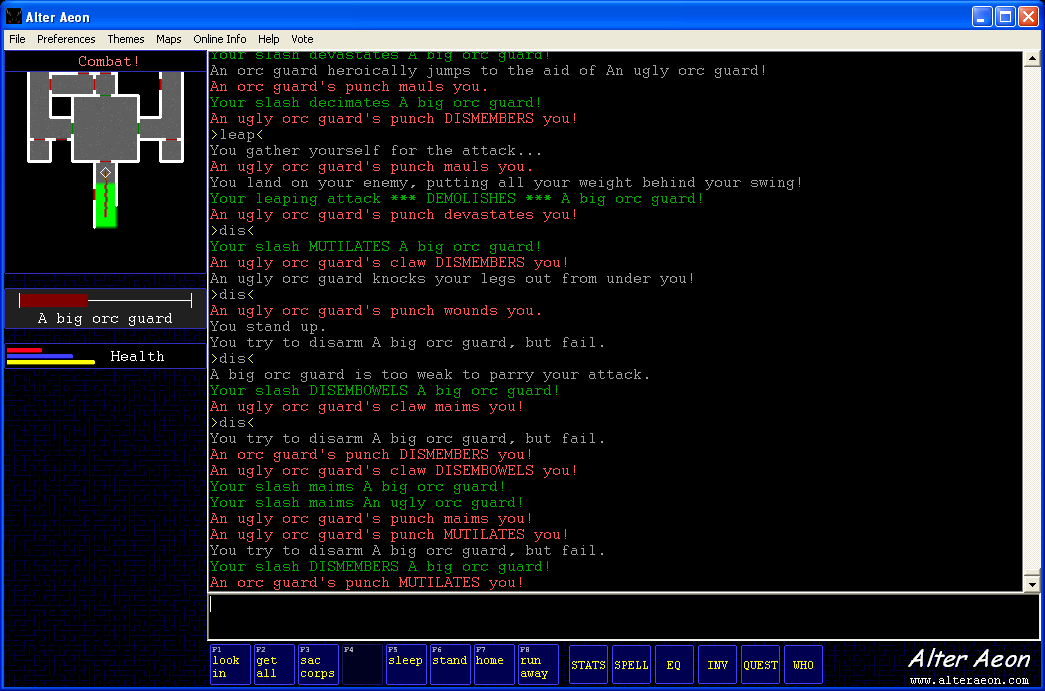

The basic theme support and the overall interface cleanup should help us a lot with new players. The first 30 seconds of pretty buys you the next 30 seconds, etc. It seems to take forever, but incremental improvements do really add up over time.
Again, the download is at http://www.dentinmud.org/AlterAeon.exe. Snag a copy and check it out!
Monday, May 11, 2009
Client release and changelog
A new client release, 0.980, is out! The changelog is at the bottom of this note, with the previous changelog for 0.979 since I didn't post that anywhere else. At some point, I need to get the changelogs integrated into the server code.
The biggest two changes from my perspective were automap improvements and the enemy hp bar. The automap was by far the hardest, as display code has to be nearly perfect, and it has to handle a boatload of corner/edge cases. There's really not a lot of ways to do it cleanly, and for some scenarios you simply have to special case it. Here is an example of a particular problem area before the changes:

Here is the same location with the new mapper:

For compact areas such as this one, it makes a huge difference.
The enemy hitpoint bar is another interesting addition, in that it displays the condition of whatever you're fighting, similar to how Diablo II does it. There's a problem with it however - the current location is off to the side, above the automap. This turns out to be remarkably hard to see and use while fighting, even though it's close to the scrolling text and the input window.
I think what's going on is that the left hand side of the client is now simply too 'busy' for the eye to easily handle. Diablo II handled this by putting the enemy hp bar in a well defined, easy location (top dead center), and you knew that the middle of the screen was the most important place to look. The hp and mana bubbles were left and right bottom corner respectively. Each location is very easy to deal with.
For the client however, we have the big main window, which pretty much needs to be scanned continuously in order to keep up with things, the typing bar at the bottom but sorta off to the side, the hp and mana bars above that but right next to it, and the enemy status bar to the left somewhere in the lower middle of the screen. It's just not that easy to find things.
One option I've been kicking around is to make the status bar two levels deep, with the enemy hp directly above your hp. Not only does this give a good way to directly compare yourself against the target, but it puts both things in a very visible, single location.
I did some looking around at adding audio, and think I've found some libraries that should do the job. It's a lot of work though, and it might be best for me to figure out how to do actions and triggers first.
Changes in version 0.980 - May 08, 09
-------------------------------------------------------------
Keypad '5' now performs 'scan'.
Keypad '-' now walks 'down'.
Keypad '+' now walks 'up'.
Minor improvement to url clicking.
Don't lock main window unless more than one character is selected.
Diagonal exits now display a bit more cleanly.
Added basic zoom in/zoom out on landscape scale changes.
Left hand layout now puts automap at bottom of screen.
The automap is now either on all the time or off all the time, it no longer toggles based on login state.
Allow ctrl-+ and ctrl-- to more reliably change font when using keypad movement mode.
A display window for a target hp bar is now visible above the left hand side automap.
Changes in version 0.979 - Apr 28, 09
-------------------------------------------------------------
Add walking via number keypad. Toggleable using 'preferences' menu.
Clear scroll lock when a button is clicked.
Add 'local echo' option under 'preferences' menu.
Help message when you disconnect/are disconnected is now highlighted.
Prevent beeping for additional key combinations.
Add mousewheel support.
The 'quit' dialog buttons have been changed from 'Quit' to 'Exit Program' instead.
Command queue cleared when you're disconnected, so your next connect attempt doesnt immediately error out at the name prompt.
The '//clear' command now clears scrollback, like the menu.
The 'clear' command in game now works. It sends two screens full of blank lines, so you don't lose your scrollback.
Mapping colors tweaked to better show towns and cities.
Default ansi colors tweaked a bit to get more color saturation.
Ansi color palette options added for ZMud style colors and bright colors.
When you start fighting, the area map will display 'Combat!' instead of the area name.
A new "Left Side Layout" option has been added under preferences. This moves the buttons and automap to the left side of the screen, whereit's closer to the various text windows.
The biggest two changes from my perspective were automap improvements and the enemy hp bar. The automap was by far the hardest, as display code has to be nearly perfect, and it has to handle a boatload of corner/edge cases. There's really not a lot of ways to do it cleanly, and for some scenarios you simply have to special case it. Here is an example of a particular problem area before the changes:
Here is the same location with the new mapper:
For compact areas such as this one, it makes a huge difference.
The enemy hitpoint bar is another interesting addition, in that it displays the condition of whatever you're fighting, similar to how Diablo II does it. There's a problem with it however - the current location is off to the side, above the automap. This turns out to be remarkably hard to see and use while fighting, even though it's close to the scrolling text and the input window.
I think what's going on is that the left hand side of the client is now simply too 'busy' for the eye to easily handle. Diablo II handled this by putting the enemy hp bar in a well defined, easy location (top dead center), and you knew that the middle of the screen was the most important place to look. The hp and mana bubbles were left and right bottom corner respectively. Each location is very easy to deal with.
For the client however, we have the big main window, which pretty much needs to be scanned continuously in order to keep up with things, the typing bar at the bottom but sorta off to the side, the hp and mana bars above that but right next to it, and the enemy status bar to the left somewhere in the lower middle of the screen. It's just not that easy to find things.
One option I've been kicking around is to make the status bar two levels deep, with the enemy hp directly above your hp. Not only does this give a good way to directly compare yourself against the target, but it puts both things in a very visible, single location.
I did some looking around at adding audio, and think I've found some libraries that should do the job. It's a lot of work though, and it might be best for me to figure out how to do actions and triggers first.
Changes in version 0.980 - May 08, 09
-------------------------------------------------------------
Keypad '5' now performs 'scan'.
Keypad '-' now walks 'down'.
Keypad '+' now walks 'up'.
Minor improvement to url clicking.
Don't lock main window unless more than one character is selected.
Diagonal exits now display a bit more cleanly.
Added basic zoom in/zoom out on landscape scale changes.
Left hand layout now puts automap at bottom of screen.
The automap is now either on all the time or off all the time, it no longer toggles based on login state.
Allow ctrl-+ and ctrl-- to more reliably change font when using keypad movement mode.
A display window for a target hp bar is now visible above the left hand side automap.
Changes in version 0.979 - Apr 28, 09
-------------------------------------------------------------
Add walking via number keypad. Toggleable using 'preferences' menu.
Clear scroll lock when a button is clicked.
Add 'local echo' option under 'preferences' menu.
Help message when you disconnect/are disconnected is now highlighted.
Prevent beeping for additional key combinations.
Add mousewheel support.
The 'quit' dialog buttons have been changed from 'Quit' to 'Exit Program' instead.
Command queue cleared when you're disconnected, so your next connect attempt doesnt immediately error out at the name prompt.
The '//clear' command now clears scrollback, like the menu.
The 'clear' command in game now works. It sends two screens full of blank lines, so you don't lose your scrollback.
Mapping colors tweaked to better show towns and cities.
Default ansi colors tweaked a bit to get more color saturation.
Ansi color palette options added for ZMud style colors and bright colors.
When you start fighting, the area map will display 'Combat!' instead of the area name.
A new "Left Side Layout" option has been added under preferences. This moves the buttons and automap to the left side of the screen, whereit's closer to the various text windows.
Thursday, April 23, 2009
Remapping of cities
In the quest for linearity and mapping in the game, the answer for towns and cities is clear and obvious: all rooms are the same size. I remapped and expanded the main city in Alter Aeon today, which really cleared up a lot of conflicts and has left no rooms on top of each other. It maps clean, and it wasn't even a lot of work. Here's an example of the client map for the new version:

There's lots of roads, lots of places for shops and other stuff, and a few dead spots to allow for expansion. Most of the player comments have been positive, which is surprising - generally anything that messes up someone's directions causes all kinds of havoc.
This doesn't address the issue of how to handle large expanses of space though, for example forests and other linkage areas. You really don't get an idea of how big the world is until you put into perspective the relative size of cities.
Take for example, my home town. It's a small town of 5-10k people, and from the recent Google maps it's a little over a mile in diameter. Meanwhile, the state in which in which it's located is around 250 miles in diameter (except that its squarish.) Take a penny and tape it to your wall. That's the size difference, and that's just one state, not an entire continent. For a continent, tape a quarter to skyscraper.
I'd like to think Ralnoth in the game is probably about the same size. The currently expanded Ralnoth is about 12 rooms wide and 25 tall; let's say 15 for the sake of argument. Meanwhile, the entire game is perhaps 400 rooms across and tall, neglecting portals to islands and the like. This makes the entire Alter Aeon mainland around 30 miles in diameter.
We have entire mountain ranges, jungles, swamps, other cities, and the shores of two oceans on the mainland. All within 15 miles of the central city of Ralnoth. Starting to see the picture?
A more reasonable continent size is on the order of 500-1000 miles. Even for a 500 mile wide continent, the scale of Ralnoth would imply walking through a minimum of 7500 rooms to get from one side to the other. This is probably not reasonable from a gameplay standpoint, so we need to find a different approach.
The simplest and easiest is to simply define cities to be much larger than they are. If we declare Ralnoth to be ten miles across instead of 1, we end up with a much more reasonable room count. But in that case, even the smallest house represents half a square mile of land area.
A better approach seems to be to change the size of roads and paths, such that the desired distances can be achieved. This kills the dull/boring wilderness areas and gets people out into the world to do something interesting.
I think there's a couple of different ways to handle this. One is to have different sized rooms and render them as best you can. Perhaps using terrain or other flags you can automatically decide what rooms are what size.
But it seems to me that a far better and easier way is to separate large and small sized zones from each other. When you leave one, you end up in the other with a different set of maps. For example, leaving a town shows the town zooming to a small size relative to the forest you're walking in. So many games have done this in the past, that it's a trivially obvious feature. It also happens to be a very good candidate for my overall mapping problems.
I'll let you all know if it works out.
There's lots of roads, lots of places for shops and other stuff, and a few dead spots to allow for expansion. Most of the player comments have been positive, which is surprising - generally anything that messes up someone's directions causes all kinds of havoc.
This doesn't address the issue of how to handle large expanses of space though, for example forests and other linkage areas. You really don't get an idea of how big the world is until you put into perspective the relative size of cities.
Take for example, my home town. It's a small town of 5-10k people, and from the recent Google maps it's a little over a mile in diameter. Meanwhile, the state in which in which it's located is around 250 miles in diameter (except that its squarish.) Take a penny and tape it to your wall. That's the size difference, and that's just one state, not an entire continent. For a continent, tape a quarter to skyscraper.
I'd like to think Ralnoth in the game is probably about the same size. The currently expanded Ralnoth is about 12 rooms wide and 25 tall; let's say 15 for the sake of argument. Meanwhile, the entire game is perhaps 400 rooms across and tall, neglecting portals to islands and the like. This makes the entire Alter Aeon mainland around 30 miles in diameter.
We have entire mountain ranges, jungles, swamps, other cities, and the shores of two oceans on the mainland. All within 15 miles of the central city of Ralnoth. Starting to see the picture?
A more reasonable continent size is on the order of 500-1000 miles. Even for a 500 mile wide continent, the scale of Ralnoth would imply walking through a minimum of 7500 rooms to get from one side to the other. This is probably not reasonable from a gameplay standpoint, so we need to find a different approach.
The simplest and easiest is to simply define cities to be much larger than they are. If we declare Ralnoth to be ten miles across instead of 1, we end up with a much more reasonable room count. But in that case, even the smallest house represents half a square mile of land area.
A better approach seems to be to change the size of roads and paths, such that the desired distances can be achieved. This kills the dull/boring wilderness areas and gets people out into the world to do something interesting.
I think there's a couple of different ways to handle this. One is to have different sized rooms and render them as best you can. Perhaps using terrain or other flags you can automatically decide what rooms are what size.
But it seems to me that a far better and easier way is to separate large and small sized zones from each other. When you leave one, you end up in the other with a different set of maps. For example, leaving a town shows the town zooming to a small size relative to the forest you're walking in. So many games have done this in the past, that it's a trivially obvious feature. It also happens to be a very good candidate for my overall mapping problems.
I'll let you all know if it works out.
Sunday, March 29, 2009
Clients and Newbies
I recently released a new client update for Alter Aeon, one that includes (but is not limited to) the following cool changes:
- vastly upgraded automap
- vote menu
- 'last command select'
- various settings now save
- function key alias mapping
This really is a big step forward in the evolution of the client, and I've received a lot of compliments on it. Unfortunately, there is a problem with this client release, and it all goes back to the problem of newbie retention. But before we go into that, here's some background on the current state of newbies on the game.
-----
There appears to be three primary types of new player right now:
1) Sighted players from mudlists, who generally already have a client. These players usually don't download the custom client, and if they did they probably would go back to their own client anyway.
2) Blind players who use blind clients. They generally don't use the AA client, as it has crap for blind player support.
3) True new players who probably have never mudded before. These people are the long-term future, as the number of mudlist players is shrinking and blind players will eventually get their eyes fixed. This is also by far the largest market to tap. You don't compete with World of Warcraft unless you're hitting up ordinary sighted people.
The mudlist players will pretty much do their own thing. There's a limit to how much you can do with them, as they have their own opinions already. Many are unrecoverable, as they have been damaged by some other mud.
Blind players we seem to be doing reasonably well with. I have no complaints here, other than making the AA client work really well with readers would probably help a good amount.
The third category, by far the biggest market, is the problem. Since they have no prior mudding experience, odds are very good they downloaded the client, which shows up easily in my stats. I can also track logins based on web page hits. If this class of player is sticking around, I'll see it by looking for newbie players using the client.
This is exactly what I don't see. I see the expected players log in with the client, just as they should. There's a large initial dropout rate, but a good percentage of them level and play for a while. After that they all disappear. We're not keeping people entertained.
I suspect what's going on is they play for a while, run out of stuff to do or don't see the point, and bail. That pretty much describes my first mudding experiences; I got a low level character and basically just wandered around looking at stuff. None of the text meant anything in particular to me, and I would wander ridiculous places because I didn't know where to go or what to do. I didn't even know what the point of the game was.
I clearly need to add a lot more statistics tracking and try to see where the dropoffs are occuring - what level ranges, number of logins, etc. With this information in hand we can improve the introductory areas; but so far, my initial numbers indicate that the dropoffs happen for the newbie areas that are well tested and considered in good shape. So what is really going on?
-----
The final piece of the puzzle revolves around the massively improved automap function in the new client. I tried really hard to play with the mouse for a while, and it worked as well as could be expected. Unfortunately, when using and concentrating on exploring using the map, the entire text window (which contains everything that's important) disappears. Not from the client, but from your mind. It simply isn't as important as the automap. Looking back at it takes effort.
So say you're exploring with the map. You see unexplored spots on the map, you know you can go that way, and you click the button to go there. Nothing happens. You click the button again - you just want to go explore that part of the map - and nothing happens again. How irritating.
Nothing happens because you're fighting. But unless you take your eyes off the map and look back to the main window, you don't notice it. You just get irritated that you didn't move when you clicked the button. And all the scrolling crap in the main window, highlighted and all, really doesn't mean anything to you.
I've got a few things in the works to combat this, including audio sounds for fighting, changing the buttons in combat, and changing the area description to list various positions such as "Combat!", sleeping, resting, etc. That will have to wait until next week though, as I've got a lot of web work to get caught up on as well.
It's definitely a good problem to chew on.
- vastly upgraded automap
- vote menu
- 'last command select'
- various settings now save
- function key alias mapping
This really is a big step forward in the evolution of the client, and I've received a lot of compliments on it. Unfortunately, there is a problem with this client release, and it all goes back to the problem of newbie retention. But before we go into that, here's some background on the current state of newbies on the game.
-----
There appears to be three primary types of new player right now:
1) Sighted players from mudlists, who generally already have a client. These players usually don't download the custom client, and if they did they probably would go back to their own client anyway.
2) Blind players who use blind clients. They generally don't use the AA client, as it has crap for blind player support.
3) True new players who probably have never mudded before. These people are the long-term future, as the number of mudlist players is shrinking and blind players will eventually get their eyes fixed. This is also by far the largest market to tap. You don't compete with World of Warcraft unless you're hitting up ordinary sighted people.
The mudlist players will pretty much do their own thing. There's a limit to how much you can do with them, as they have their own opinions already. Many are unrecoverable, as they have been damaged by some other mud.
Blind players we seem to be doing reasonably well with. I have no complaints here, other than making the AA client work really well with readers would probably help a good amount.
The third category, by far the biggest market, is the problem. Since they have no prior mudding experience, odds are very good they downloaded the client, which shows up easily in my stats. I can also track logins based on web page hits. If this class of player is sticking around, I'll see it by looking for newbie players using the client.
This is exactly what I don't see. I see the expected players log in with the client, just as they should. There's a large initial dropout rate, but a good percentage of them level and play for a while. After that they all disappear. We're not keeping people entertained.
I suspect what's going on is they play for a while, run out of stuff to do or don't see the point, and bail. That pretty much describes my first mudding experiences; I got a low level character and basically just wandered around looking at stuff. None of the text meant anything in particular to me, and I would wander ridiculous places because I didn't know where to go or what to do. I didn't even know what the point of the game was.
I clearly need to add a lot more statistics tracking and try to see where the dropoffs are occuring - what level ranges, number of logins, etc. With this information in hand we can improve the introductory areas; but so far, my initial numbers indicate that the dropoffs happen for the newbie areas that are well tested and considered in good shape. So what is really going on?
-----
The final piece of the puzzle revolves around the massively improved automap function in the new client. I tried really hard to play with the mouse for a while, and it worked as well as could be expected. Unfortunately, when using and concentrating on exploring using the map, the entire text window (which contains everything that's important) disappears. Not from the client, but from your mind. It simply isn't as important as the automap. Looking back at it takes effort.
So say you're exploring with the map. You see unexplored spots on the map, you know you can go that way, and you click the button to go there. Nothing happens. You click the button again - you just want to go explore that part of the map - and nothing happens again. How irritating.
Nothing happens because you're fighting. But unless you take your eyes off the map and look back to the main window, you don't notice it. You just get irritated that you didn't move when you clicked the button. And all the scrolling crap in the main window, highlighted and all, really doesn't mean anything to you.
I've got a few things in the works to combat this, including audio sounds for fighting, changing the buttons in combat, and changing the area description to list various positions such as "Combat!", sleeping, resting, etc. That will have to wait until next week though, as I've got a lot of web work to get caught up on as well.
It's definitely a good problem to chew on.
Wednesday, February 4, 2009
Graphical automap
After a long hiatus, I got a new version of the Alter Aeon Mudding Client built and released for Windows. This version fixes a lot of bugs, but is still subject to the quirks and peculiarities of whatever version of Windows it runs on. This is really irritating, as the URL linking is black (and hence invisible) on some versions of windows, but not on others.
The big update is the graphical automapper, which renders squarish blocks based on terrain and some flags. Auto-generated tiles are what I'm using right now, and all things considered it's not terrible, though it's also not great. Here is a link to a screenshot of the Linux/X version of the client, to give you a rough idea. The Windows version looks similar, with slightly different font sizes and different borders/edges.
As usual, with a new release comes new bugs: the control keys appear to no longer work, the 'vanishing url' problem is still present, diagonal exits don't work (this requires a server and protocol change), and a number of more minor bugs have been reported. It's also lacking blind/visually impaired support, though the default support is already much better than for the old client.
All this (except for blind support, which may be impossible) needs to be fixed before it's suitable to take over the place of the old client. It's getting a lot closer though.
One thing I'm grudgingly coming to terms with is the player desire for triggers and variables in the client. Normal mudders aren't going to use it until it has reasonable features for scripting. I really don't want to encourage scripting, but it may be a necessary evil to getting people to use it.
My hope with this project is that low quality graphics and a visual display are better than no display whatsoever. The game is complex, well balanced, and solid - people who play it tend to stick around and find it entertaining for long periods of time. Getting people into it seems the hardest part.
A possible vote in favor of a bad client being better than no client comes from friends of existing players. I can't even remember how many times I've been told some version of the following:
"I tried to get my friend into it, but he/she just couldn't understand how a game that's only words could possibly work."
Even if it's just a cheesy icon indicating where you are, it at least gives non-mudders a reference: everyone's played old school tile-based games. I hope.
Another major concern I have is that I'm now officially encroaching on what I'd call the territory of other, vastly better funded games. This marks the first real foray into adding graphics to the system; right now that consists of low quality, autogenerated graphics, using a mapping system which doesn't even work reliably (due to area linearity and such.) What I have is crude, primitive, and unartistic.
People can get low quality graphics anywhere; and attempting to compete with modern high-quality rendered 3D games is a non-starter, unless you have a reasonably large budget. Further, the game as it stands is fundamentally not designed to be 3D rendered. It would take a major rework to add support for that, and likely result in the destruction of most of the interesting game content.
So the big question becomes: what is the next step for the client, after it's stable and usable by the default population?
Right now, the only big hitter I have on my list is another type of automap, one that uses the generated area maps from the Alter Aeon World Maps page. The server would send approximate X/Y coordinate pairs, and the client could map them to the appropriate position on the generated maps. This would give people an idea of which areas they were near, and approximately where they were at.
Beyond that, I really don't know. I'm sure something will present itself.
The big update is the graphical automapper, which renders squarish blocks based on terrain and some flags. Auto-generated tiles are what I'm using right now, and all things considered it's not terrible, though it's also not great. Here is a link to a screenshot of the Linux/X version of the client, to give you a rough idea. The Windows version looks similar, with slightly different font sizes and different borders/edges.
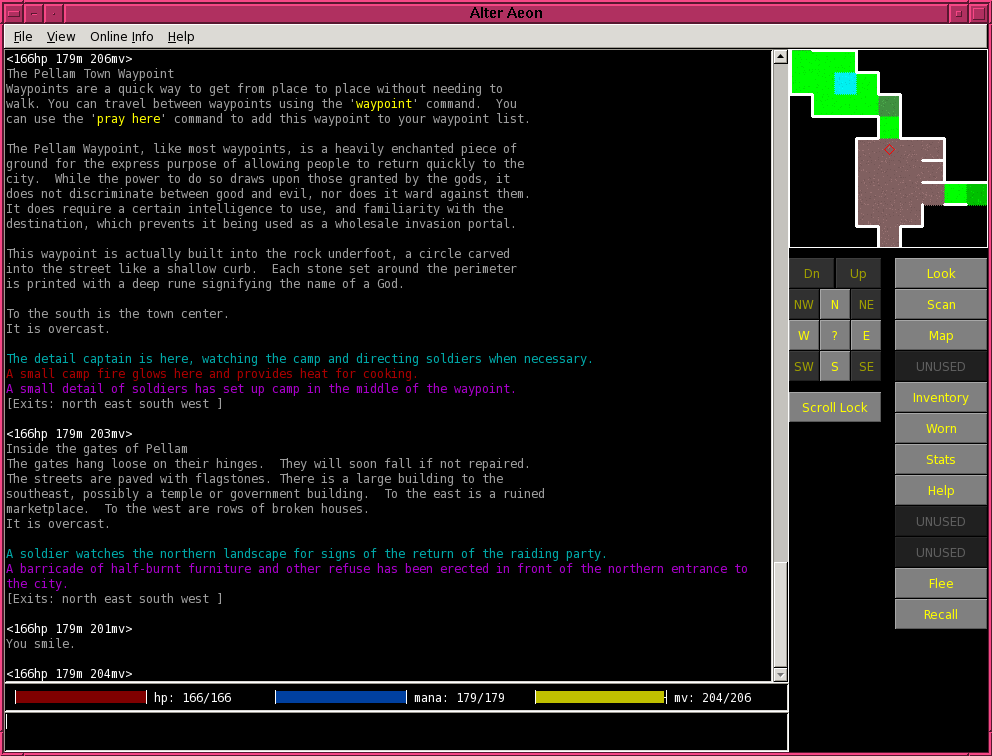
As usual, with a new release comes new bugs: the control keys appear to no longer work, the 'vanishing url' problem is still present, diagonal exits don't work (this requires a server and protocol change), and a number of more minor bugs have been reported. It's also lacking blind/visually impaired support, though the default support is already much better than for the old client.
All this (except for blind support, which may be impossible) needs to be fixed before it's suitable to take over the place of the old client. It's getting a lot closer though.
One thing I'm grudgingly coming to terms with is the player desire for triggers and variables in the client. Normal mudders aren't going to use it until it has reasonable features for scripting. I really don't want to encourage scripting, but it may be a necessary evil to getting people to use it.
My hope with this project is that low quality graphics and a visual display are better than no display whatsoever. The game is complex, well balanced, and solid - people who play it tend to stick around and find it entertaining for long periods of time. Getting people into it seems the hardest part.
A possible vote in favor of a bad client being better than no client comes from friends of existing players. I can't even remember how many times I've been told some version of the following:
"I tried to get my friend into it, but he/she just couldn't understand how a game that's only words could possibly work."
Even if it's just a cheesy icon indicating where you are, it at least gives non-mudders a reference: everyone's played old school tile-based games. I hope.
Another major concern I have is that I'm now officially encroaching on what I'd call the territory of other, vastly better funded games. This marks the first real foray into adding graphics to the system; right now that consists of low quality, autogenerated graphics, using a mapping system which doesn't even work reliably (due to area linearity and such.) What I have is crude, primitive, and unartistic.
People can get low quality graphics anywhere; and attempting to compete with modern high-quality rendered 3D games is a non-starter, unless you have a reasonably large budget. Further, the game as it stands is fundamentally not designed to be 3D rendered. It would take a major rework to add support for that, and likely result in the destruction of most of the interesting game content.
So the big question becomes: what is the next step for the client, after it's stable and usable by the default population?
Right now, the only big hitter I have on my list is another type of automap, one that uses the generated area maps from the Alter Aeon World Maps page. The server would send approximate X/Y coordinate pairs, and the client could map them to the appropriate position on the generated maps. This would give people an idea of which areas they were near, and approximately where they were at.
Beyond that, I really don't know. I'm sure something will present itself.
Friday, January 9, 2009
xml xml xml
I really hate that hitting enter while in the title bar automatically posts, even if the post body is empty.
Today, I added support for XML dumping of player data via the web interface. This was at the request of the player Cu, whose XML data can now be seen at http://dentinmud.org:3004/xml/players/cu. The idea was to export various player statistics so that he could dump it into a database and do databasey things with it; in short, a third party app using AA data.
I really dislike XML, but I like this plan. I also hope to export other data, hopefully without compromising the game itself, so that more things can be done with it.
This reboot also brings in a handful of minor changes to newbie sends and the email command, but more importantly it brings in a major change to area checking. We now have code to check linkages between areas and figure out how far off in terms of relative position they are. This should help us line up the world and get things to be a little more grid-like.
This gridlike preparation is in anticipation of graphical maps in the dclient.
In other news, there's a bunch of presentation/toolkit bugs in the client, pointed out by various people. Some of them do not look easy to fix.
Today, I added support for XML dumping of player data via the web interface. This was at the request of the player Cu, whose XML data can now be seen at http://dentinmud.org:3004/xml/players/cu. The idea was to export various player statistics so that he could dump it into a database and do databasey things with it; in short, a third party app using AA data.
I really dislike XML, but I like this plan. I also hope to export other data, hopefully without compromising the game itself, so that more things can be done with it.
This reboot also brings in a handful of minor changes to newbie sends and the email command, but more importantly it brings in a major change to area checking. We now have code to check linkages between areas and figure out how far off in terms of relative position they are. This should help us line up the world and get things to be a little more grid-like.
This gridlike preparation is in anticipation of graphical maps in the dclient.
In other news, there's a bunch of presentation/toolkit bugs in the client, pointed out by various people. Some of them do not look easy to fix.
Tuesday, October 28, 2008
Custom Clients
Today was a productive day porting/rewriting the old Alter Aeon client to a new toolkit. I've run into the standard types of weirdness (such as resize not working properly and inability to change the font in an input window), but in general things are going pretty well. I was able to connect to the game and talk to people with it today.
One thing I never really understood was just how much code is in this thing. There's a -lot- of little detailed things that consume time and code space. It's these little things that make it such a good (if boring) piece of software; from the main window changing color on scroll lock to global font size changing. So while the client is currently usable, it will be a long time before everything is properly ported and functional.
In the short term, the goal is going to be to duplicate as much of the previous functionality as is reasonable, and re-release that version as being 'improved', even if it's just a smaller download size. Once this code base is stable, I'm going to rip up the automapper and see about adding in the various map based things I talked about in previous posts.
At the current rate of improvement, it's likely that I won't even be to a re-release version for probably a month.
One thing I never really understood was just how much code is in this thing. There's a -lot- of little detailed things that consume time and code space. It's these little things that make it such a good (if boring) piece of software; from the main window changing color on scroll lock to global font size changing. So while the client is currently usable, it will be a long time before everything is properly ported and functional.
In the short term, the goal is going to be to duplicate as much of the previous functionality as is reasonable, and re-release that version as being 'improved', even if it's just a smaller download size. Once this code base is stable, I'm going to rip up the automapper and see about adding in the various map based things I talked about in previous posts.
At the current rate of improvement, it's likely that I won't even be to a re-release version for probably a month.
Subscribe to:
Posts (Atom)